
Complete Guide to
Instagram Unfollowers
Learn how to safely track who unfollowed you, why Instagram doesn't show it, and the only method that won't risk your account
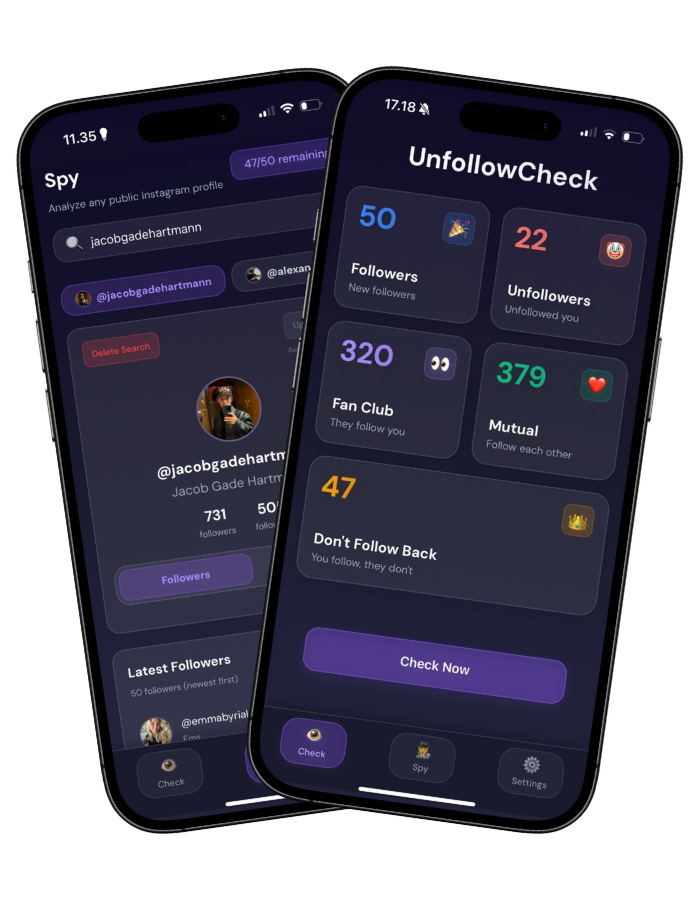
Why Doesn't Instagram Show Unfollowers?
Instagram deliberately hides unfollower information for several important reasons
Privacy Protection
Instagram wants to respect users' privacy when they unfollow accounts. Notification systems would create uncomfortable social dynamics.
Reduce Social Anxiety
Knowing who unfollowed you can create negative feelings and platform stress that Instagram wants to avoid.
Focus on Positive Engagement
Instagram prefers users focus on creating content rather than tracking who left.
API Limitations
Instagram's official Graph API intentionally doesn't expose follower relationship changes to third-party apps.
How to Track Unfollowers Safely
3 simple steps - no password, zero risk
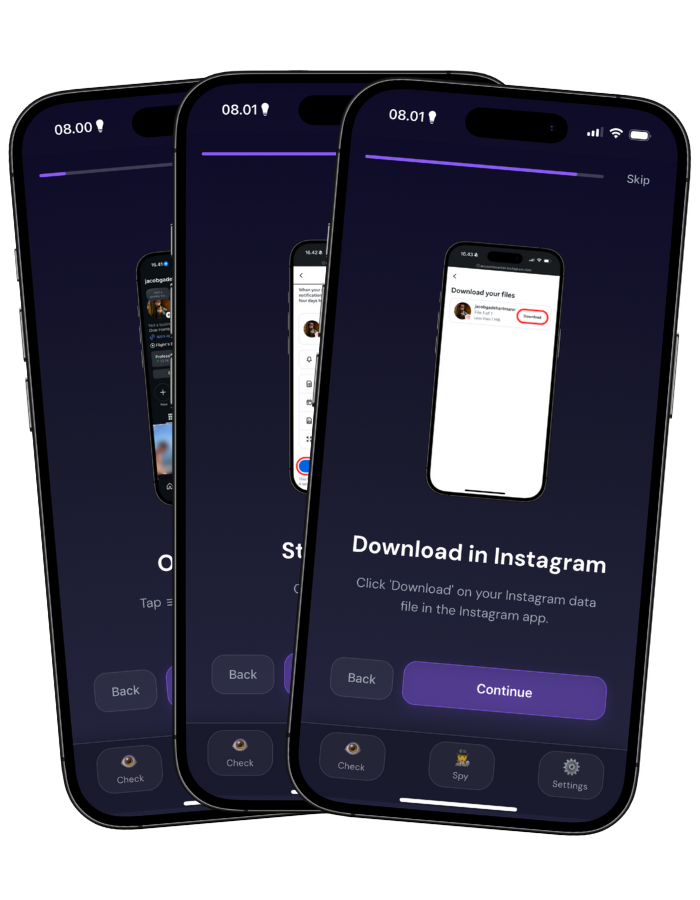
Follow Our In-App Guide
UnfollowCheck has a simple step-by-step guide built right into the app. Just follow along to safely download your Instagram data.
Upload Your Data File
Upload your Instagram data ZIP file to UnfollowCheck. Everything processes locally on your device - no uploads to external servers.
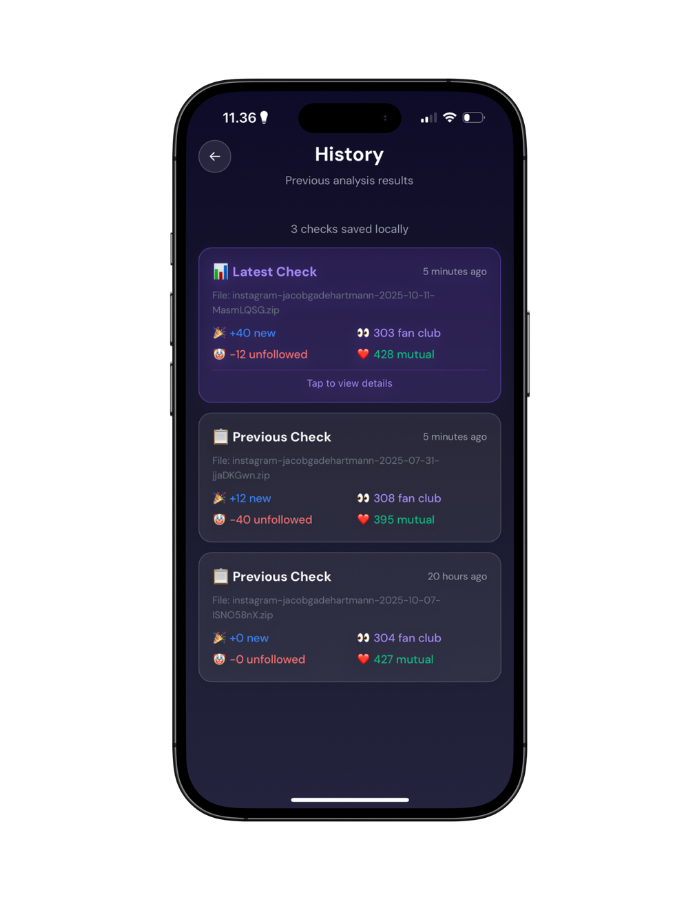
Get Complete Insights
Instantly see unfollowers, fan club, new followers, who doesn't follow back, and track your growth over time!
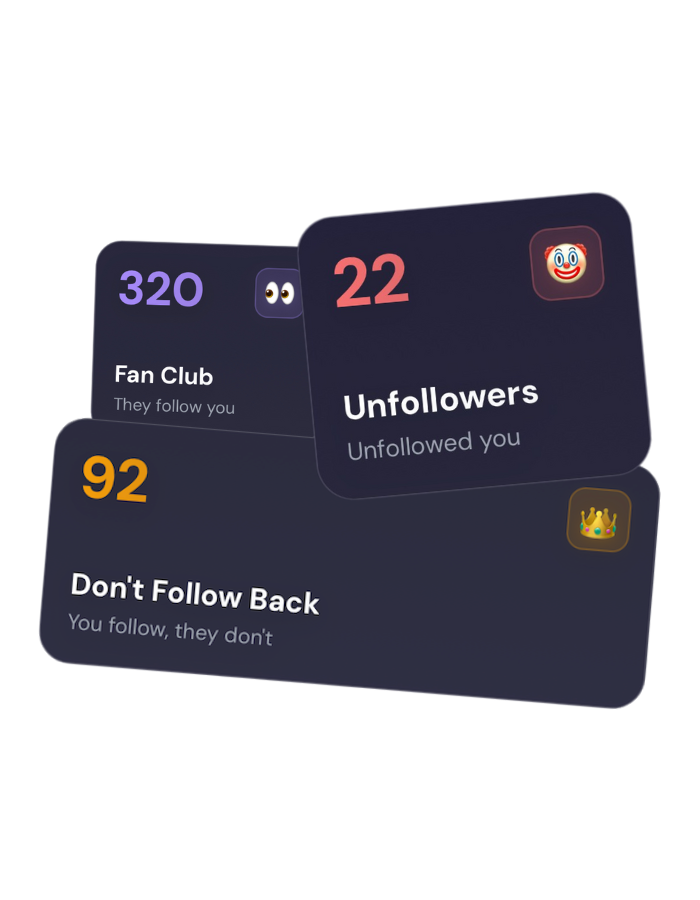
Everything You Need
Complete Instagram follower insights in one safe app
See Who Unfollowed You
Instantly discover who unfollowed you and when they stopped following
Who Doesn't Follow Back
Find out who you follow but they don't follow you back
Anonymous Spy Feature
Track anyone's followers anonymously - they'll never know
Your Fan Club
See your most loyal followers who always support you
Growth Tracking
Monitor new followers and changes over time
100% Safe & Private
No password needed. All data stays on your device
Safe vs. Risky Methods
Not all unfollower trackers are created equal
Safe Method
UnfollowCheck - Official Data Export
No password required
Zero account risk
On-device processing only
Official Instagram method
Risky Methods
Password-Required Apps
Requires your password
Account suspension risk
Data uploaded to servers
Violates Instagram ToS
Common Mistakes to Avoid
Learn from others' mistakes to keep your account safe and your tracking accurate
Using Password-Based Apps
Many users download apps that require their Instagram password, thinking it's the only way to track unfollowers.
Why it's bad: This violates Instagram's Terms of Service and can result in account suspension or hacking. According to Instagram's official policy, sharing your password with third-party apps is strictly prohibited.
Do this instead: Use UnfollowCheck with Instagram's official data export - no password needed, fully compliant with Instagram's rules.
Obsessing Over Unfollowers Daily
Some users check for unfollowers multiple times per day, creating unnecessary anxiety.
Why it's bad: Constant checking can lead to stress, comparison, and unhealthy social media habits. Research shows excessive social media monitoring correlates with increased anxiety.
Do this instead: Check weekly or monthly. Use insights to improve your content, not to stress about individual unfollows.
Public Confrontation About Unfollowing
Some users publicly call out people who unfollowed them, creating drama and negativity.
Why it's bad: This creates toxic social dynamics and can damage relationships. It also makes you look insecure and obsessive.
Do this instead: Keep tracking private. Use insights internally to improve your content strategy, not to create public drama.
Using Multiple Trackers Simultaneously
Some users install multiple unfollower tracking apps at once, thinking more data is better.
Why it's bad: Multiple apps accessing your account (especially password-based ones) increases security risk and can trigger Instagram's security alerts.
Do this instead: Use one trusted app (UnfollowCheck) that provides all the insights you need safely.
Ignoring App Permissions
Users often grant excessive permissions without reading what apps are requesting.
Why it's bad: Some apps request permissions they don't need, potentially accessing personal data or contacts. Always review permissions carefully.
Do this instead: UnfollowCheck only needs access to your data export file - no contacts, photos, or other permissions required.
Attempting Manual Tracking
Some users try to manually scroll through followers lists to find who unfollowed.
Why it's bad: This is extremely time-consuming, inaccurate, and impossible for accounts with hundreds or thousands of followers. You'll miss most unfollowers.
Do this instead: Use automated comparison through UnfollowCheck - it's instant, accurate, and catches every unfollower.
Advanced Tips for Smart Tracking
Go beyond basic tracking - use insights strategically to grow your account
Optimal Checking Frequency
Most successful users check weekly or monthly, not daily. Weekly checks give you a good sense of trends without creating anxiety. Monthly checks provide a broader view of follower patterns and help identify seasonal trends.
According to social media analytics best practices, monitoring follower changes weekly balances insight with mental health. Daily checking often correlates with increased social media anxiety.
Interpreting Unfollower Patterns
Not all unfollows are bad. Analyze patterns: Did many unfollow after a specific post? After you changed content direction? After a break? These insights help you understand what content resonates with your audience.
Focus on trends, not individual unfollows. If you lose 10 followers but gain 50, that's growth. If you consistently lose more than you gain, consider adjusting your content strategy.
Balance Growth vs. Unfollowers
Healthy accounts have natural follower churn. Even top influencers lose followers regularly. What matters is your net growth - if you're gaining more than you're losing, you're growing.
Don't obsess over every unfollow. Instead, track your net follower count over time. If you're consistently growing, occasional unfollows are normal and expected.
Using Insights Strategically
Use unfollower data to improve your content strategy. If people unfollow after specific types of posts, consider posting less of that content. If your "fan club" (most engaged followers) loves certain content, create more of it.
Your fan club shows who your true audience is. Focus on creating content for them, not for the followers who rarely engage and might unfollow anyway.
Troubleshooting Guide
Common issues and how to solve them
Follower Count Doesn't Match
Problem: Your follower count in UnfollowCheck doesn't match Instagram's displayed count.
Solution: Instagram's displayed count updates in real-time, while your data export reflects the moment you requested it. Small discrepancies are normal due to timing differences. If the difference is large, request a fresh data export.
Data Upload Failed
Problem: UnfollowCheck can't process your uploaded ZIP file.
Solution: Ensure you're uploading the complete ZIP file from Instagram, not extracted files. Make sure the file isn't corrupted - try downloading it again from Instagram. Check that you selected "Followers and following" when requesting your data export.
App Shows Wrong Unfollowers
Problem: UnfollowCheck shows people as unfollowers who still follow you.
Solution: This usually happens if your data export is outdated. Request a fresh export from Instagram and upload it. The comparison is only accurate if your baseline export is recent (within 24-48 hours).
Instagram Data Export Pending
Problem: Instagram says your data export is still being prepared.
Solution: Instagram typically prepares data exports within 5-15 minutes, but can take up to 48 hours for large accounts. Check your email for the download link. If it's been more than 48 hours, request a new export.
Can't Find ZIP File
Problem: You received Instagram's email but can't locate the ZIP file.
Solution: Check your email's download folder or spam folder. On iPhone, check the Files app under "Downloads" or "On My iPhone". The file is usually named something like "instagram-username.zip". If the download link expired, request a new export.
Missing Followers in Results
Problem: Some followers aren't showing up in your UnfollowCheck analysis.
Solution: Ensure you selected "All time" date range when requesting your Instagram data export. If you selected a limited date range, older followers won't be included. Request a new export with "All time" selected.
Privacy & Security: What You Need to Know
Transparency about how your data is handled
What Data Is Collected
UnfollowCheck only processes the Instagram data export file you upload. This file contains:
- Your followers list (usernames only)
- Your following list (usernames only)
- No passwords, personal messages, photos, or other private data
According to Instagram's data export documentation, follower and following lists contain only usernames, not personal information.
Where Data Is Stored
All data processing happens locally on your device. UnfollowCheck:
- Never uploads your data to external servers
- Stores comparison results only on your device
- Doesn't sync data to cloud services
- Doesn't share data with third parties
This is different from password-based apps, which upload your data to their servers for processing, creating security risks.
How Data Is Processed
UnfollowCheck uses a local comparison algorithm:
- Compares your current follower list with previous uploads
- Identifies differences (new followers, unfollowers, non-followers)
- All calculations happen on your device's processor
- No internet connection required after initial data upload
Because processing happens locally, even if your device is offline, UnfollowCheck can analyze your data. This ensures maximum privacy and security.
Your Rights
You have complete control over your data:
- Delete anytime: Uninstall the app to remove all locally stored data
- Export your analysis: Save lists of unfollowers, non-followers, etc. before deleting
- No data retention: We don't keep backups or copies of your data
- No tracking: UnfollowCheck doesn't track your app usage or behavior
Under privacy laws like GDPR and CCPA, you have the right to access, delete, and export your data. UnfollowCheck makes this easy - just delete the app or export your data before uninstalling.
Frequently Asked Questions
Does Instagram notify you when someone unfollows you?
No, Instagram does not provide notifications when someone unfollows your account. The platform prioritizes user privacy and doesn't send alerts about follower changes. You need to use a third-party tool like UnfollowCheck to track unfollowers.
Is it safe to use unfollower tracking apps?
It depends on the method. Apps that require your Instagram password pose serious security risks and violate Instagram's terms of service. UnfollowCheck is safe because it uses Instagram's official data export feature and never asks for your password. All analysis happens on your device.
How do unfollower trackers work?
Unfollower trackers work by comparing your follower list at different points in time. When you download your Instagram data export and upload it to an app like UnfollowCheck, it compares this with your previous upload to identify who unfollowed you, who doesn't follow back, and track new followers.
Can I see who unfollowed me without an app?
Without an app, you would need to manually compare your follower list by scrolling through all your followers at different times. For accounts with hundreds or thousands of followers, this is practically impossible. Apps like UnfollowCheck automate this comparison instantly.
Why can't Instagram add a built-in unfollower feature?
Instagram doesn't provide unfollower tracking to maintain platform privacy and reduce social anxiety. The company wants to focus on positive engagement rather than who unfollowed whom. However, you can still use your data export with third-party tools to see these insights.
How long does it take to see unfollowers?
With UnfollowCheck, you'll see unfollowers immediately after uploading your second Instagram data export. The first upload establishes a baseline, and each subsequent upload shows changes since your last check. Instagram's data export typically takes 5-15 minutes to prepare and email to you.
Does Instagram notify when you unfollow someone?
No, Instagram does not notify users when you unfollow them. This privacy feature works both ways - you won't know if someone unfollows you, and they won't know if you unfollow them. This design choice reduces social pressure and confrontation on the platform.
Can people see if I'm tracking them?
No, unfollower tracking is completely private. When you use UnfollowCheck with Instagram's official data export, you're only analyzing your own data file. There's no way for others to know you're tracking unfollowers unless you tell them.
What happens if I delete the app?
If you delete UnfollowCheck, all your data stored locally on your device is removed. Your Instagram account remains unaffected. You can always reinstall the app and upload a new data export to resume tracking. UnfollowCheck never stores your data on external servers.
How far back can I see unfollowers?
You can see unfollowers dating back to your first data export upload. If you've been using UnfollowCheck for 6 months and upload data weekly, you'll have historical data showing unfollower trends over that entire period. Instagram's data export includes all-time follower data.
Does this work for private accounts?
Yes, UnfollowCheck works for both public and private Instagram accounts. Since you're using your own data export (which includes your followers regardless of account privacy), privacy settings don't affect tracking functionality.
Can I track multiple accounts?
Yes, you can track multiple Instagram accounts with UnfollowCheck. Simply upload separate data exports for each account. The app keeps them organized separately, so you can track personal and business accounts independently.
What if Instagram changes their API?
UnfollowCheck uses Instagram's official data export feature, which has been stable for years. Even if Instagram changes their API for third-party apps, the data export feature (which is part of Instagram's privacy compliance) is unlikely to change. If it does, UnfollowCheck will update accordingly.
How often should I check for unfollowers?
Most users check weekly or monthly to track patterns without obsessing daily. Checking too frequently (daily) can create unnecessary anxiety. Checking monthly gives you a good overview of follower trends and helps you identify patterns.
Can I export the unfollower data?
Yes, UnfollowCheck allows you to export your unfollower analysis. You can save lists of unfollowers, non-followers, and your fan club for external reference or record-keeping purposes.
Does this work on Android?
Currently, UnfollowCheck is available for iOS. However, you can use the web version from any device. Instagram's data export works the same way regardless of your device, so once you download your data file, you can analyze it on any platform.
What's the difference between unfollowers and non-followers?
Unfollowers are people who previously followed you but then stopped. Non-followers are people you follow who don't follow you back (they may have never followed you). Both are useful insights - unfollowers show who left, while non-followers show one-sided relationships.
Will Instagram ever add this feature?
There's no indication Instagram plans to add native unfollower tracking. Their design philosophy focuses on reducing social comparison and anxiety. However, Instagram continues to support data exports (required by privacy laws), which enables third-party tracking tools like UnfollowCheck.
References & Sources
All claims on this page are backed by authoritative sources. In-text citations appear throughout the article, and all sources are listed below:
Instagram Help Center - Privacy Policy
Information about Instagram's privacy features and why they don't notify about unfollowers.
https://help.instagram.com/116024195217477Instagram Help Center - Data Download
Official documentation on Instagram's data export feature, including follower and following lists.
https://help.instagram.com/181231772500920Instagram Graph API Documentation
Technical documentation explaining API limitations regarding follower relationship data.
https://developers.facebook.com/docs/instagram-apiUnfollowCheck Official Website
Product information about UnfollowCheck's features and data processing methods.
https://unfollowcheck.comSocial Media Analytics Research
Industry best practices regarding social media monitoring frequency and mental health considerations.
General industry knowledge from social media analytics best practices
Last verified: November 4, 2025 | All links verified and accessible at time of publication
Start Tracking Unfollowers Today
Safe, private, and password-free. See who unfollowed you, who doesn't follow back, and track growth over time.
Or use web version →(limited features)
Last updated: November 4, 2025